반응형
오브젝트 풀링이란?
게임 오브젝트를 필요할 때마다 생성하고 파괴하는 대신, 미리 생성해둔 오브젝트들을 재사용하는 메모리 관리 기법
오브젝트가 필요할 때는 풀에서 꺼내서 활성화하고, 필요 없을 때는 비활성화하여 다시 풀에 반환
오브젝트 풀링을 사용하는 이유
1. 실시간 성능 향상
- 오브젝트 생성/파괴는 비용이 큰 작업이므로, 미리 생성된 오브젝트를 재사용하면 성능이 크게 향상됨
2. 메모리 파편화 방지
- 지속적인 생성/파괴로 인한 메모리 파편화를 예방할 수 있음
3. 가비지 컬렉션 감소
- 오브젝트 파괴로 인한 가비지 컬렉션 발생을 줄일 수 있음
Instantiate와 Destroy의 문제점
1. 높은 CPU 부하
- 오브젝트 생성 및 파괴는 CPU를 많이 사용하는 작업임
2. 메모리 단편화
- 지속적인 생성/파괴로 인해 메모리가 조각나는 현상 발생함
3. 가비지 컬렉션 유발
- Destroy 호출 시 가비지 컬렉션이 발생할 수 있음
4. 프레입 드랍
- 많은 오브젝트를 동시에 생성/파괴할 때 프레임 저하 발생함
기본 구현
public class ObjectPool : MonoBehaviour
{
    [System.Serializable]
    public class Pool
    {
        public string tag;
        public GameObject prefab;
        public int size;
    }

    public List<Pool> pools;
    public Dictionary<string, Queue<GameObject>> poolDictionary;

    void Start()
    {
        poolDictionary = new Dictionary<string, Queue<GameObject>>();
        foreach (Pool pool in pools)
        {
            Queue<GameObject> objectPool = new Queue<GameObject>();
            for (int i = 0; i < pool.size; i++)
            {
                GameObject obj = Instantiate(pool.prefab);
                obj.SetActive(false);
                objectPool.Enqueue(obj);
            }
            poolDictionary.Add(pool.tag, objectPool);
        }
    }
}
활용 사례
- 총알 시스템
- 파티클 이펙트
- 적 캐릭터 스폰
- UI 요소 재사용
실전 예제
public class BulletPool : MonoBehaviour
{
    public static BulletPool Instance;
    public GameObject bulletPrefab;
    public int poolSize = 100;

    private Queue<GameObject> bulletPool;

    void Awake()
    {
        Instance = this;
        bulletPool = new Queue<GameObject>();

        // 풀 초기화
        for (int i = 0; i < poolSize; i++)
        {
            CreateNewBullet();
        }
    }

    void CreateNewBullet()
    {
        GameObject bullet = Instantiate(bulletPrefab);
        bullet.SetActive(false);
        bulletPool.Enqueue(bullet);
    }

    public GameObject GetBullet()
    {
        if (bulletPool.Count == 0)
        {
            CreateNewBullet();
        }

        GameObject bullet = bulletPool.Dequeue();
        bullet.SetActive(true);
        return bullet;
    }

    public void ReturnBullet(GameObject bullet)
    {
        bullet.SetActive(false);
        bulletPool.Enqueue(bullet);
    }
}
성능 분석
예시 코드로 보는 차이
// 기존 방식 (비효율적)
void SpawnBullet()
{
    GameObject bullet = Instantiate(bulletPrefab);
    Destroy(bullet, 2f);  // 2초 후 파괴
}

// 오브젝트 풀링 방식 (효율적)
void SpawnBullet()
{
    GameObject bullet = bulletPool.GetBullet();  // 풀에서 가져오기
    StartCoroutine(ReturnBulletToPool(bullet, 2f));
}

IEnumerator ReturnBulletToPool(GameObject bullet, float delay)
{
    yield return new WaitForSeconds(delay);
    bulletPool.ReturnBullet(bullet);  // 풀에 반환
}
실제 성능 측정
오브젝트 풀 클래스
using System.Collections;
using System.Collections.Generic;
using UnityEngine;

public class ObjectPoolTest : MonoBehaviour
{
    public GameObject prefab;
    public int poolSize = 20;
    private Queue<GameObject> objectPool = new Queue<GameObject>();

    private void Awake()
    {
        for (int i = 0; i < poolSize; i++)
        {
            CreateNewObject();
        }
    }

    private void CreateNewObject()
    {
        GameObject obj = Instantiate(prefab);
        obj.SetActive(false);
        objectPool.Enqueue(obj);
    }

    public GameObject GetObject()
    {
        if (objectPool.Count == 0)
        {
            CreateNewObject();
        }

        GameObject obj = objectPool.Dequeue();
        obj.SetActive(true);
        return obj;
    }

    public void ReturnObject(GameObject obj)
    {
        obj.SetActive(false);
        objectPool.Enqueue(obj);
    }
}
테스트 할 클래스
using System.Collections;
using System.Collections.Generic;
using UnityEngine;
using UnityEngine.Pool;

public class PerformanceTest : MonoBehaviour
{
    [Header("Test Settings")]
    public GameObject prefab;
    public int testCount = 1000;
    public KeyCode testKey = KeyCode.Space;
    public bool runTestOnStart = true;

    [Header("References")]
    public ObjectPoolTest objectPool;

    private List<GameObject> normalObjects = new List<GameObject>();
    private float startTime;
    private float endTime;

    private void Start()
    {
        if (runTestOnStart)
        {
            RunTest();
        }
    }

    private void Update()
    {
        if (Input.GetKeyDown(testKey))
        {
            RunTest();
        }
    }

    private void RunTest()
    {
        if (objectPool == null)
        {
            Debug.LogError("ObjectPool이 설정되지 않았습니다!");
            return;
        }

        Debug.Log($"=== 성능 테스트 시작 (테스트 수: {testCount}) ===");
        TestNormal(testCount);
        TestPooling(testCount);
        Debug.Log("=== 성능 테스트 종료 ===");
    }

    private void TestNormal(int count)
    {
        startTime = Time.realtimeSinceStartup;

        for (int i = 0; i < count; i++)
        {
            GameObject obj = Instantiate(prefab);
            normalObjects.Add(obj);
        }

        foreach (var obj in normalObjects)
        {
            Destroy(obj);
        }
        normalObjects.Clear();

        endTime = Time.realtimeSinceStartup;
        float elapsedTime = (endTime - startTime) * 1000f;
        Debug.Log($"일반 방식 실행 시간: {elapsedTime:F2}ms");
    }

    private void TestPooling(int count)
    {
        startTime = Time.realtimeSinceStartup;

        List<GameObject> pooledObjects = new List<GameObject>();
        for (int i = 0; i < count; i++)
        {
            GameObject obj = objectPool.GetObject();
            pooledObjects.Add(obj);
        }

        foreach (var obj in pooledObjects)
        {
            objectPool.ReturnObject(obj);
        }

        endTime = Time.realtimeSinceStartup;
        float elapsedTime = (endTime - startTime) * 1000f;
        Debug.Log($"풀링 방식 실행 시간: {elapsedTime:F2}ms");
    }
}
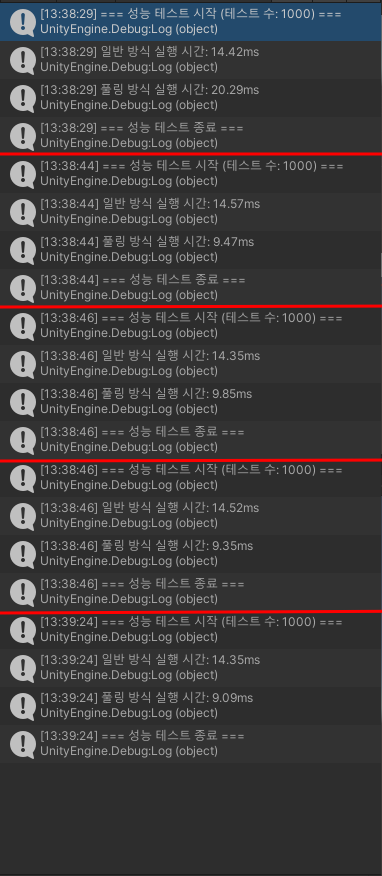
필자의 컴퓨터에서 실험해본 결과
결론
1. 오브젝트 풀링의 핵심 장점
- 가비지 컬렉션(GC) 감소
- 메모리 관리
- CPU 부하 관리
2. 사용이 권장되는 상황
- 총알, 파티클 등 빈번하게 생성/제거되는 오브젝트
- 모바일 게임처럼 성능이 중요한 환경
- 실시간성이 중요한 게임
3. 구현 시 주의사항
- 초기 풀 사이즈는 최대 사용량을 고려하여 설정
- 재사용 시 오브젝트 상태 초기화 필수
- 필요한 경우 동적으로 풀 크기 조절
4. 실제 성능 테스트 결과
- Instantiate/Destroy 방식보다 약 1.5배 빠른 실행 속도
최적화에 매우 효과적인 기법이며, 특히 모바일 게임이나
많은 오브젝트를 다루는 게임에서는 필수적인 최적화 방법이다
반응형
'유니티 > 문법' 카테고리의 다른 글
| [Unity] 유니티 C#) Delegate ( 델리게이트 ), Anonymous Method (익명 메서드) ,Lambda ( 람다 ) (0) | 2025.01.07 |
|---|---|
| [Unity] 유니티 C#) Garbage Collector ( 가비지 컬렉터 ) (0) | 2025.01.06 |
| [Unity] 유니티 C#) ScriptableObject ( 스크립터블오브젝트 ) (0) | 2025.01.02 |
| [Unity] 유니티 C#) 코루틴(Coroutine) (1) | 2024.12.27 |
| [Unity] 유니티 C#) 네임스페이스 ( namespace ) (0) | 2024.12.26 |